
Adobe Premiere Pro 26.5.2
Adobe Premiere Pro 2026 brings AI-powered video and audio generation directly to the timeline via the Generative Media Tool, plus Enhance Audio, Separate Crosstalk, Color Mode with Auto Color, and Frame.io cloud integration. The single-app subscription is $22.99/month ($19.99 for students), with a 7-day free trial. It requires Windows 11 24H2 or later, minimum 8 GB RAM (32 GB recommended for 4K), and 4 GB GPU memory. DaVinci Resolve offers a powerful free alternative, while Final Cut Pro is ideal for Mac users. Premiere Pro remains the professional standard, but the subscription model and hardware demands are worth considering.
- Free trial
- Windows
- macOS
- Android
- iOS
- Nov 7, 2026
Screenshots
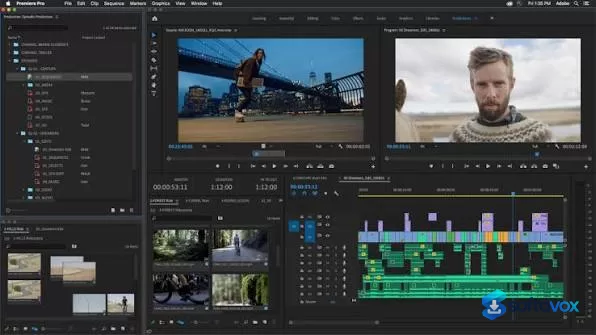
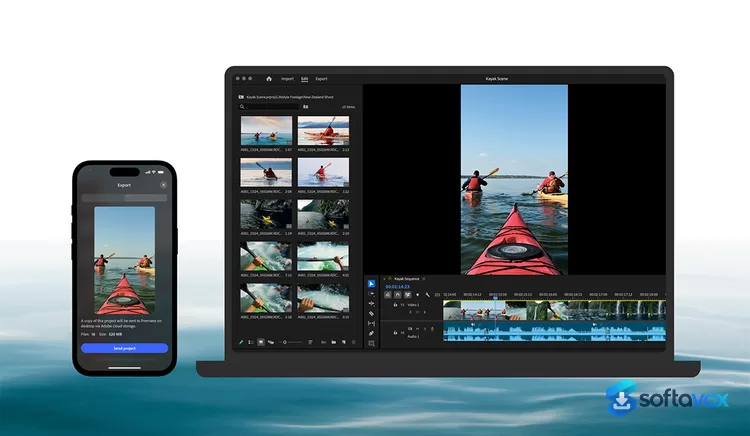
About Adobe Premiere Pro
Adobe Premiere Download, Professional Video Editing Software
TL;DR Quick Take / Who is this for?
Adobe Premiere is the industry-standard non-linear video editor, and the 2026 release (version 26.x) is its most AI-integrated version yet. It remains the tool most studios, agencies, and professional editors standardize on, and for good reason: it handles high-resolution formats up to 10,240 × 8,192 pixels, integrates deeply with After Effects and Photoshop, and now includes a suite of AI features that speed up tedious tasks like transcription, rough-cutting, and media organization. The headline additions are Text-Based Editing, which lets you edit video by editing a transcript, and Generative Extend, which uses AI to lengthen clips. The trade-offs are significant. Premiere is subscription-only, with the single-app plan starting at $22.99 per month on an annual, billed-monthly commitment. It is also resource-hungry, and the 2026 release dropped support for Windows 10, requiring Windows 11 (24H2) or macOS Sonoma or later. User reviews are positive on capability (78% of users recommend it, and it holds a 4.7 average on Software Advice) but consistently flag performance issues, a steep learning curve, and the cost of the subscription. Adobe Premiere is the right pick for professional and aspiring editors who need the industry standard, the Adobe ecosystem integration, and the latest AI tools. It is not the best choice for casual users, budget-conscious creators, or anyone on older hardware that cannot meet the new, stricter system requirements.
Quick Info Box
| License Type | Subscription (Single App $22.99/mo annual, billed monthly; Creative Cloud Pro $69.99/mo) |
|---|---|
| File Size | Approx. 3.3 GB (Windows installer package) |
| OS Compatibility | Windows 11 (24H2 or later); macOS Sonoma (14) or later |
| Latest Version | 26.5 (September 2026) |
| Developer | Adobe Inc. |
Key Features & Real-World Usability
Adobe Premiere's feature set is built around professional workflows, and the 2026 updates focus heavily on AI-assisted editing. Text-Based Editing is the most consequential addition. Premiere auto-transcribes your footage using Adobe Sensei, then lets you select, cut, and rearrange text in a transcript panel. As you edit the text, the corresponding video clips are automatically trimmed and adjusted on the timeline, making rough-cutting interview and dialogue-driven content dramatically faster. You can also bulk-delete filler words like "uh" and "umm" directly from the transcript, and the new Paper Edit feature lets you build a sequence by selecting multiple lines of text. Generative Extend, introduced in the September 2026 release, uses AI to lengthen clips by generating new frames that match the surrounding footage, and it now supports source media from 360p to 4K UHD in any aspect ratio. The Generative Media tool allows you to create video and sound effects from text prompts directly in the timeline. Beyond AI, Premiere remains a powerhouse for traditional editing. It supports industry-standard formats, offers professional color correction and grading tools with AI-assisted balancing, and includes a robust audio mixer with noise reduction and dialogue enhancement. The Essential Graphics panel and templates make it easy to create animated titles and captions, and captions can be translated into 18 languages. Integration with other Adobe apps is seamless: you can open After Effects compositions directly from Premiere, and Photoshop and Illustrator files retain their layers. The limitations are practical and well documented. The interface is dense and has a steep learning curve, with reviewers noting that "even the basic stuff takes forever to get done" for beginners. Performance can be inconsistent, particularly with high-resolution footage like 4K H.264, where some users report lag compared to DaVinci Resolve. The software is also resource-intensive, and the 2026 version's stricter system requirements mean older machines are no longer supported.
- Text-Based Editing: Auto-transcribe footage, edit video by rearranging text, and bulk-delete filler words, turning hours of rough-cutting into minutes.
- Generative Extend and Generative Media: Use AI to lengthen clips and generate video or sound effects from text prompts directly on the timeline.
- Professional color grading: AI-assisted color balancing, professional color wheels, curve controls, and built-in video scopes for accurate results.
- Advanced audio tools: Reduce noise, enhance dialogue, mix 5.1 surround sound, and use AI to auto-fit music tracks to your edits.
- Seamless Adobe ecosystem integration: Dynamic Link with After Effects and Photoshop, with layer support for imported graphics files.
- High-resolution support: Edit footage up to 10,240 × 8,192 pixels with 32-bit color depth in RGB and YUV color spaces.
- Multicamera editing: Sync angles by waveform or timecode and switch between cameras in real time.
- Extensive format support: Native support for ARRI ALEXA 35, Sony FX5, ProRes RAW, and a wide range of professional codecs.
Pros, Cons & Community/User Feedback
User sentiment around Adobe Premiere is positive on capability and integration, but consistently critical of performance and pricing. On Software Advice, it holds a 4.7 average from 574 reviews, with 78% of users recommending it. Reviewers praise its versatility and ease of use for intermediate users, with one noting "I have used it for everything from short social media clips to longer POC tutorial videos and presentations, and it has handled those projects well". Gartner Peer Insights reviewers highlight the AI text generator and the linking of the Adobe CC library as standout features. The positives are consistent: Premiere is the industry standard, it integrates seamlessly with other Adobe apps, and the AI features genuinely save time. The complaints fall into three categories. First, performance and stability: reviewers describe the software as "quite resource-intensive," particularly with 4K projects, with one noting they "had to purchase more powerful hardware". Others report that "the core stability has struggled with modern, high-res" footage, and that 4K H.264 playback can lag compared to DaVinci Resolve. Second, the learning curve: Gartner reviewers state bluntly that "it's mostly very hard to learn and even the basic stuff takes forever to get done," and that simpler, cheaper editors like CapCut can do similar jobs "way easier and in a much shorter time". Third, pricing: reviewers consistently flag the subscription cost as steep, with one noting "the price of it is a little steep" and another pointing out that "this software is only available on a subscription basis, which may be expensive for some customers". The subscription model is a recurring source of frustration, as users never own the software and must keep paying to retain access. The practical takeaway is that Premiere's capabilities and ecosystem are best-in-class, while its resource demands, learning curve, and subscription cost are the areas where users most often express dissatisfaction.
Pros
- Industry-standard editing tools with unmatched format and codec support
- Powerful AI features including Text-Based Editing and Generative Extend
- Seamless integration with After Effects, Photoshop, and the Creative Cloud ecosystem
- Professional color grading, audio mixing, and multicamera editing tools
- 78% of users recommend it, with a 4.7 average rating on Software Advice
- Regular updates deliver new features and improvements
- Broad third-party plugin and hardware support
Cons
- Subscription-only model with no perpetual license option
- Resource-intensive, requiring a powerful PC for smooth 4K editing
- Performance can be inconsistent, with lag reported on H.264 footage compared to DaVinci Resolve
- Steep learning curve for beginners
- 2026 release requires Windows 11 (24H2) or macOS Sonoma or later
- Expensive for casual users or those who only need basic editing
- Stability issues reported with high-resolution footage
Final Verdict & Safe Download Advice
Adobe Premiere remains the benchmark for professional video editing, and the 2026 release strengthens its position with genuinely useful AI features. Text-Based Editing and Generative Extend are not gimmicks, they solve real problems for editors working with interviews, documentaries, and dialogue-heavy content, and they can dramatically speed up the rough-cut stage of a project. The integration with After Effects and Photoshop is unmatched, and for anyone working in an Adobe-centric studio or agency, Premiere is the natural choice. The caveats are significant. The subscription model means you never own the software, the system requirements have tightened, and performance can be inconsistent on hardware that is not specifically built for editing. The learning curve is steep, and casual users will find simpler, cheaper tools that handle basic tasks more quickly. If you are a professional or aspiring professional who needs the industry standard and the Adobe ecosystem, Premiere is worth the cost. If you are a casual creator or on a budget, DaVinci Resolve offers a compelling free version and a one-time Studio license at $295, making it a strong alternative for many workflows.
- Download only through the Adobe Creative Cloud desktop app: Adobe applications are digitally signed, verified, and distributed securely via Adobe's official servers. Downloading Premiere from third-party sites or "cracked" sources is a common malware vector. The official Creative Cloud app is the only safe source for the installer.
- Verify the installer size and version: The Windows installer package is approximately 3.3 GB for recent versions. A dramatically smaller file claiming to be Premiere is a warning sign. The current version is 26.5.
- Check system requirements before subscribing: Premiere 26 requires Windows 11 (24H2 or later) or macOS Sonoma (14) or later, an Intel 6th-gen or AMD Ryzen 1000-series CPU with AVX2 support, 8 GB of RAM minimum (16 GB for HD, 32 GB for 4K recommended), and a GPU with at least 4 GB of VRAM.
- Use the 7-day free trial to test performance on your hardware: Adobe offers a seven-day free trial. Use it to confirm that Premiere performs acceptably on your specific machine before committing to a subscription. Performance varies significantly depending on GPU and CPU.
- Be aware of the cancellation terms: Adobe's annual plans are billed monthly but require a one-year commitment. Cancelling early may incur a fee. If you are unsure about long-term use, the monthly plan without an annual commitment costs more per month but offers more flexibility.
- Do not download "cracked" or "pre-activated" versions: Premiere is subscription-only, and cracked installers are a primary vector for malware and credential theft. The official trial and subscription are the only safe options.
Similar software









Key features
- Generative Media Tool, Generate AI video clips directly on the timeline using Adobe Firefly, Google Veo, Kling, Runway, or Luma.
- AI Audio Suite, Generate sound effects, soundscapes, and royalty-free music with simple text prompts.
- Enhance Audio, Independently control dialogue, music, ambience, and SFX within a single clip.
- Separate Crosstalk, Split two overlapping speakers into separate, editable tracks.
- Dynamic Auto Ducking, Automatically balance dialogue, music, and other audio elements without manual keyframing.
- Color Mode (Beta), Auto Color for exposure and temperature, Vignette Module, and Midtones Module for advanced grading.
- Frame.io Mounted Storage, Stream full-resolution media from the cloud directly to your timeline.
- Redesigned UI, Faster navigation, smoother performance, and ~3x faster app launch.
- Windows 11 24H2 Required, Windows 10 support has ended; 8–32 GB RAM and 4 GB GPU memory recommended.
Frequently asked questions about Adobe Premiere Pro
Is Adobe Premiere Pro safe to download and install from Adobe?
Is Adobe Premiere Pro free?
Which systems does Adobe Premiere Pro run on?
What is Adobe Premiere Pro used for?
Do I need a powerful computer to run Adobe Premiere Pro?
How do I uninstall Adobe Premiere Pro?
What’s new in Adobe Premiere Pro 26.5.2
The September 2026 release is a maintenance update that addresses several customer-reported issues. It follows the major feature release of version 26.5, which introduced significant new capabilities.
Fixed Issues (26.5.2)
Effect Controls Panel: Adjusted values using the Up and Down arrow keys were not being retained .
Network-Attached Storage (NAS) Productions: Projects sometimes failed to save on the first attempt when multiple collaborators were working on the same production simultaneously; they would save correctly on a second attempt .
Project Scanning: Scanning projects within a production could be slow immediately after opening .
Production Panel: Moving or renaming projects in the Production panel did not work consistently for productions stored on a NAS when multiple collaborators were active .
Long GOP Media: On Windows systems without GPU hardware acceleration for the format, some 10-bit 4:2:2 Long GOP media displayed visual artifacts, including green frames, during playback and export .
Generative Media Tool: Simplified information is now presented in the premium feature pop-up .
Key Features from Version 26.5 (September 2026)
The 26.5 release introduced several major features
Generative Media Tool: Generate video and sound effects directly in the Premiere timeline. Generated media can be added as editable clips to the sequence for further refinement .
Paper Edit: Create sequences directly from transcriptions. Select multiple lines in the Text panel to rapidly build sequences .
Expanded Camera Support: Import footage from Sony FX5 cameras directly into the editing workflow. Edit Sony XAVC and XOCN media with support for 32-bit float high-resolution audio .
Enhanced ProRes RAW Support: Improved compatibility makes it easier to bring ProRes RAW footage into the editing workflow .
Automatic Audio Settings Matching: "Match Source" now includes the source's audio channels and sample rate, with automatic downmixing and warnings when a format cannot support the source's channel layout .
Object Mask Refinement: New smoothness controls for more precise, natural-looking mask edges .
New and Updated Effects: A fully customizable Lens Flare for cinematic looks, a rebuilt Swirl distortion effect with new controls (the original is now in Legacy), and an updated Mosaic smoothness control .
Fixed Issues (26.5.1)
Generative Media Tool: Increased transparency for the generation and usage of credits associated with the tool .
Versions
| Version | Release date | Platform | File size | |
|---|---|---|---|---|
| Adobe Premiere Pro 26.5.2 Latest version | Sep 28, 2026 | Windows | 1,000.0 MB | Download |
Comments about Adobe Premiere Pro
No comments yet. Share your experience with this program!